.png?width=500&height=131&name=horiz-onwhite-noslogan%20(1).png)
The Global Header appears at the top of the EVA Portal and displays key organization and user information.
-
Open your internet browser.
-
Go to the EVA Portal : https://eva.mobileodt.com/
-
Log in to your account.
-
The Global Header will be visible at the top of the screen on all pages.
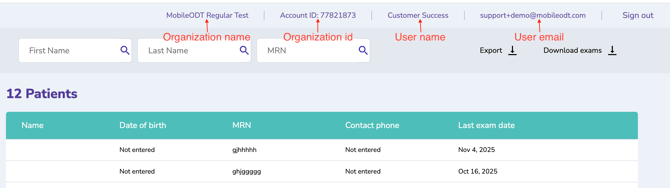
Fields in the Global Header
-
Organization Name
Displays the name of the organization currently logged in. -
Account ID
Shows the unique system generated identifier assigned to your organization. This ID may be required when contacting support. -
User Name
Indicates the full name of the currently logged in user. -
User Email
Displays the email address associated with the logged in user account. -
Sign Out
Logs the user out of the system securely and ends the current session.